MS Word Law Outliner Program : Overview with Screenshots
INTRODUCTION :
Making numerous checklists (facts, holdings, rules, case names,
course topic headings) is the key to doing well on law school essay
and multiple choice exams. Having
one big outline makes it hard
to quickly and efficiently see the key differences between the cases
and topics covered in law courses and make the associations necessary
to apply what has been taught to novel fact patterns on law school
final exams.
MS Word Law Outliner computer program utilizes cutting edge technology
to allow students to automatically create unlimited, completely
customized outlines for
all of their law courses directly from the MS Word notes they take
everyday in class without having to use any additional programs or
databases ! Also, never
before have law students been presented with such an easy to use tool
that allows them to make multiple outlines directly from their friend's
notes or notes from other students who have previously taken their
courses without having to go thru the cumbersome process of pasting all
this information into a separate, expensive outlining program. Students save precious time by using this outlining program
to effortlessly create case lists,
holding lists, fact
lists or any and all kind of lists and outlines they could possibly
want
with any combination of information they desire for their courses all
customized exactly the way they want them ! All outlines are saved
conveniently as MS Word Documents. Unlike expensive outliners designed
by other
legal software companies
which make creating customized outlines cumbersome and time consuming, and do not allow students to create outlines directly from their or another student's notes, this outliner has a simple, easy to use interface that makes creating outlines in MS Word
a snap !!!
EXAMPLE :
Please note that
the interface (button image/color/orientation/interactivity) shown below can be
easily modified to be more visually appealing or to meet your
needs/specifications.
The simplest interface was chosen as a default.
This is an example of a how a 1st year law student would use the outlining program to outline his civil procedure notes :
I. The student opens
his class notes that he types in everyday or perhaps even a previous
student's or classmate's notes for his course with his particular professor.
From the file menu the student selects the outliner program [Not Shown] which
creates a toolbar inside MS Word, alongside the student's notes.
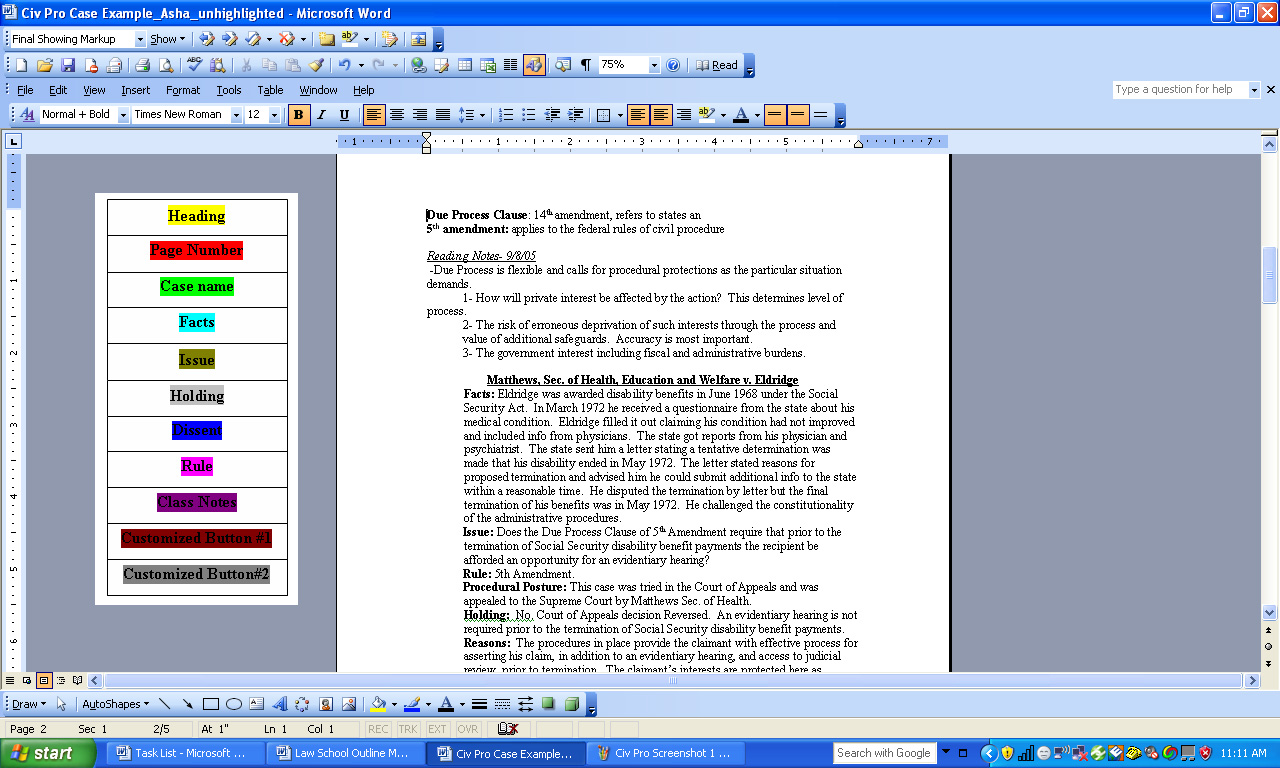
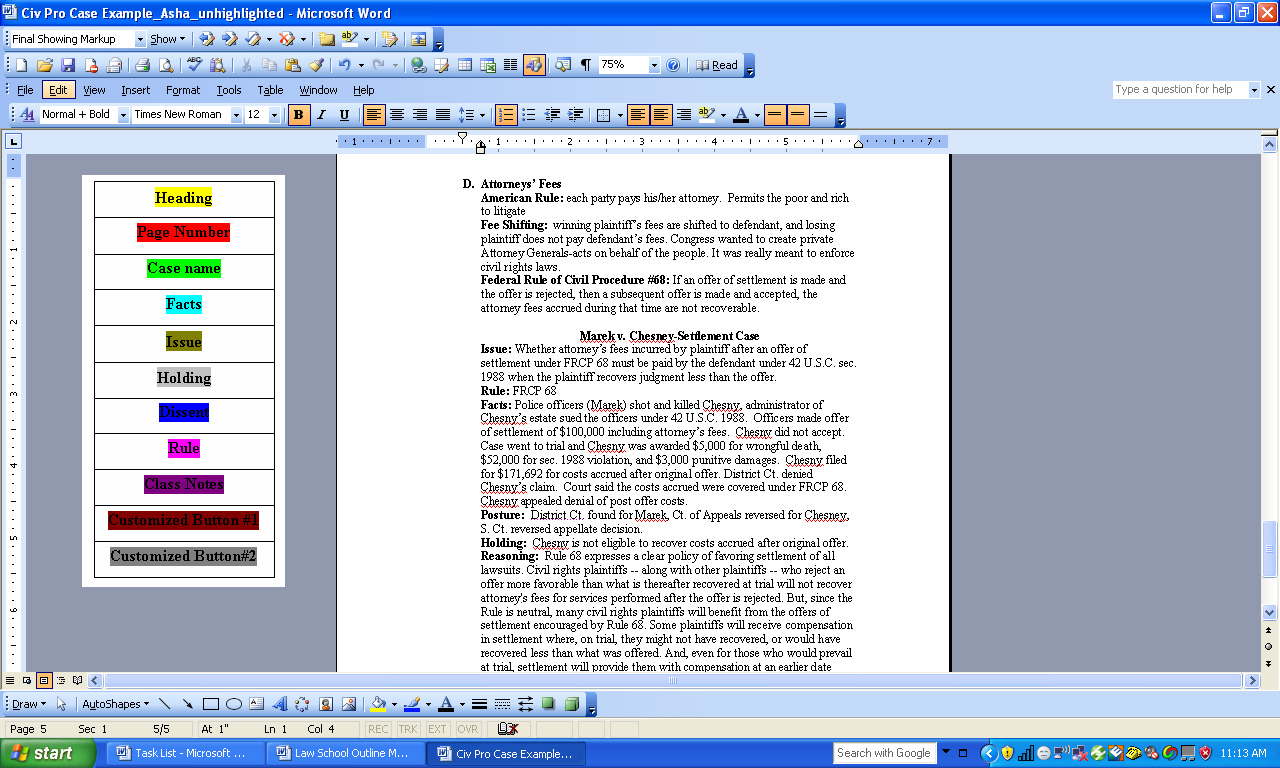
Below are three screenshots of 3 pages of the student's notes with the outlining toolbar beside it :
1.
2.
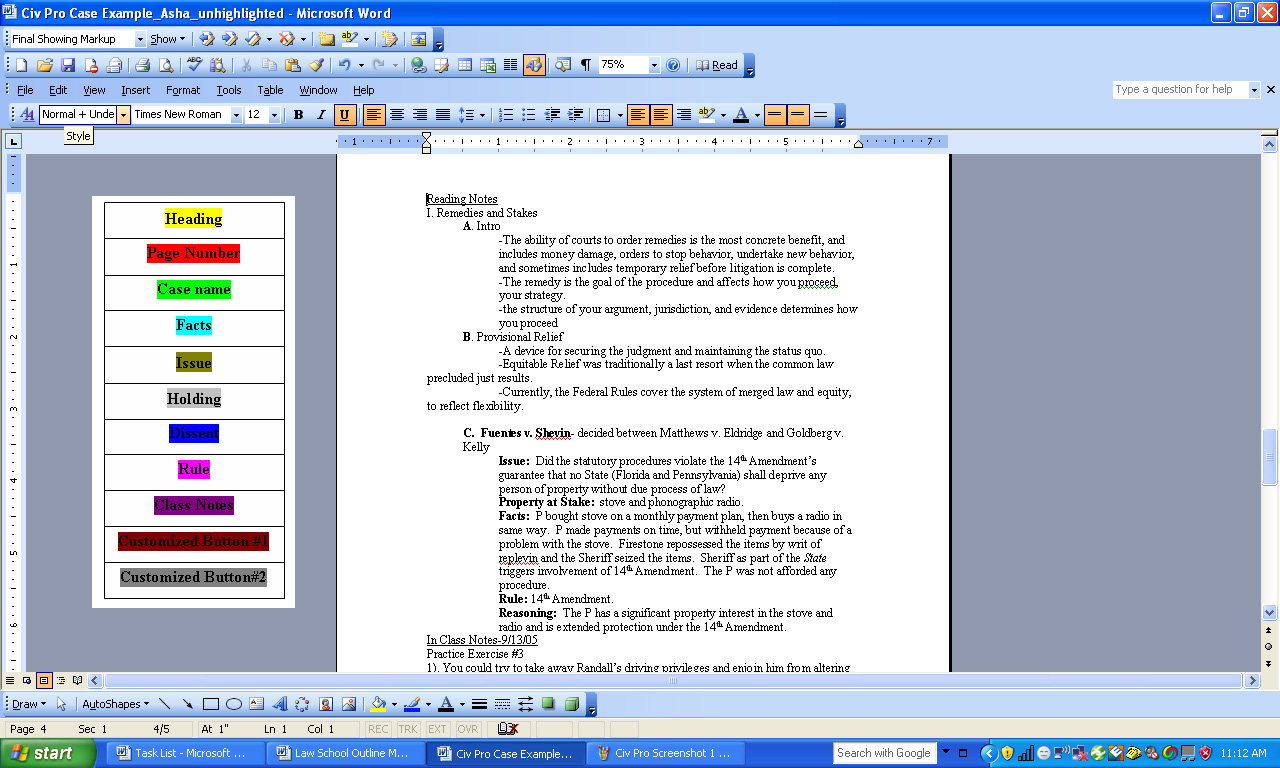
3.
II. The student then uses the button panel to designate different areas of his notes.
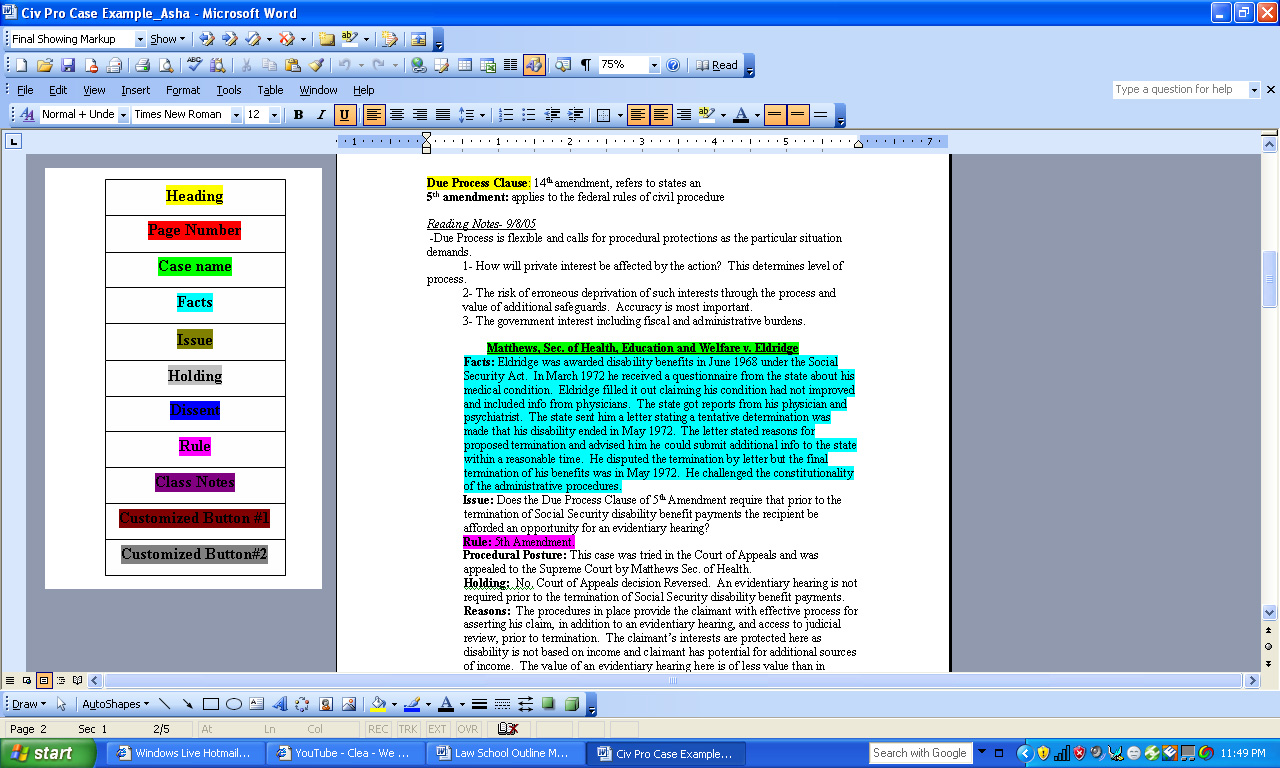
For example, in the screenshots below, the student clicks on the
heading button, and then highlights each time a heading occurs in his
notes. Here, the heading button automatically highlights in yellow, as
all the buttons show up as different colored highlighting.
*Also, notice how the student highlights the names of cases in green
highlighting using the case name button, the facts of cases in blue
highlighting, and rules in pink highlighting using the rule button. The student can customize
two buttons, to fit his/her personal needs. For example, if this were a course in Criminal Law he can create a Model
Penal Code button or a Common Law button. By using the buttons on the panel to mark up his notes, the students
"tells" the program which part of his notes are the case name, facts,
rule, etc. This allows the program to create the outline later. Notice how the student is free to choose which cases to highlight
within his notes and therefore choose what cases/topics to include in his
outline.
Below are three
screenshots showing the same 3 screenshots of the students notes, here
displaying what the notes look like after the student has marked up his
notes using four of the panel buttons : the heading, case name, facts and rules buttons:
1.
2.
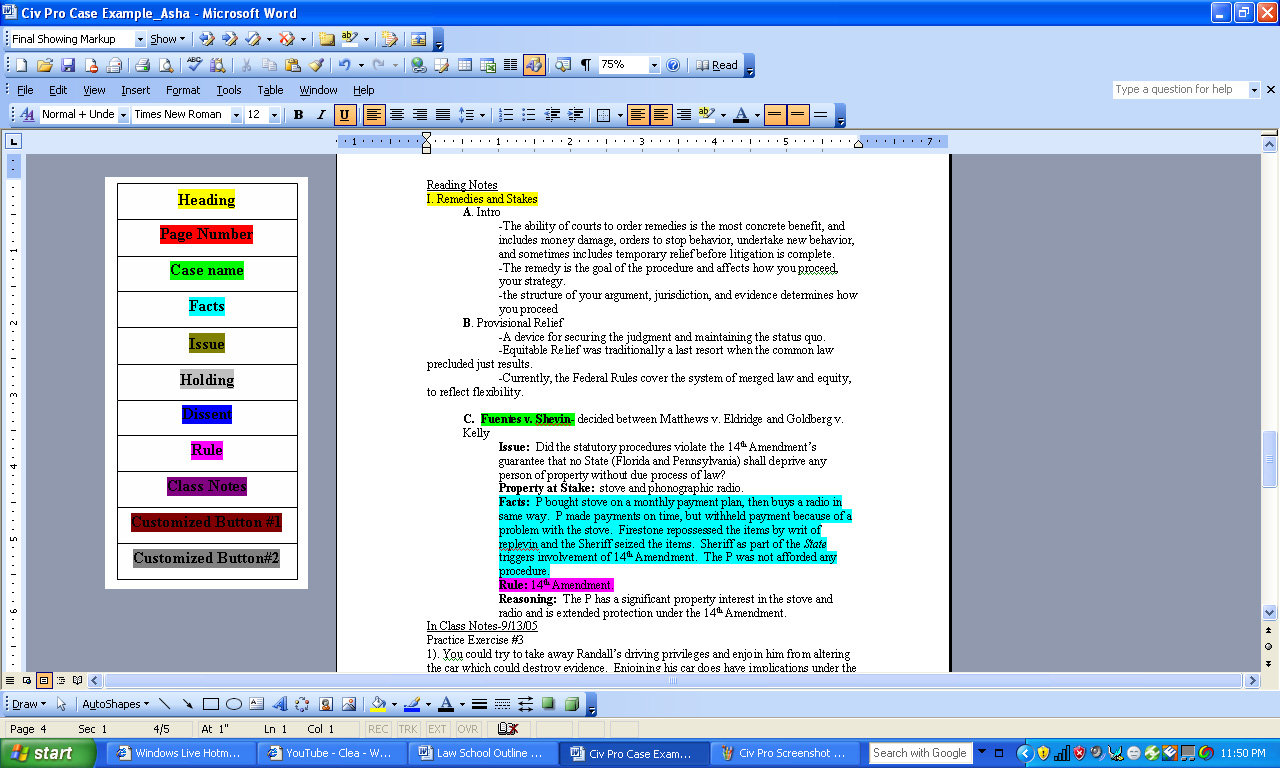
3.
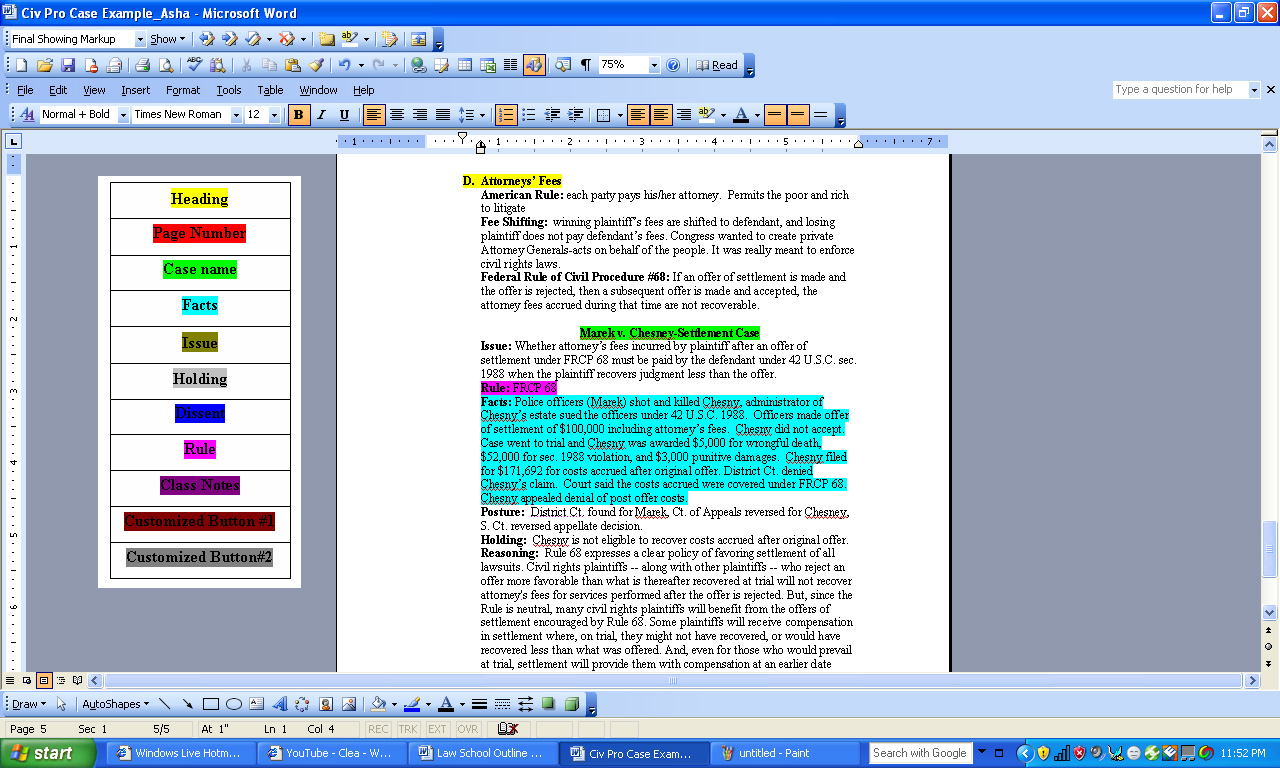
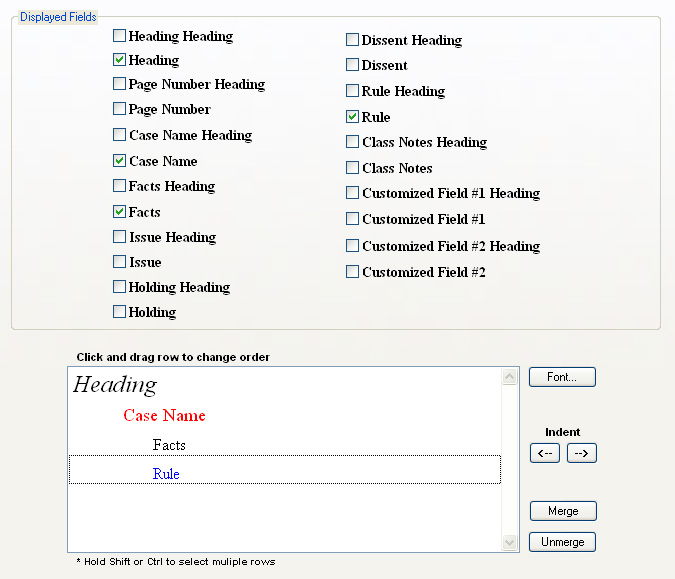
III. The student then chooses the outlining format screen from the file menu.
This allows the student to choose
1. Which fields he wishes to have in his outline (For example below, the student only checked 4 fields, and did not check the other fields)
2. What headings (For example, whether to have the heading "case name",
before the information in the case name field is placed in the outline)
3. What font, color and size for the various fields
(For example below, italicizing the heading below, making the
case name red and the rule blue)
4. How the various headings and information should be
indented (indenting the case name, double indenting the facts and rules)
Outlining format screen shown below :
IV.
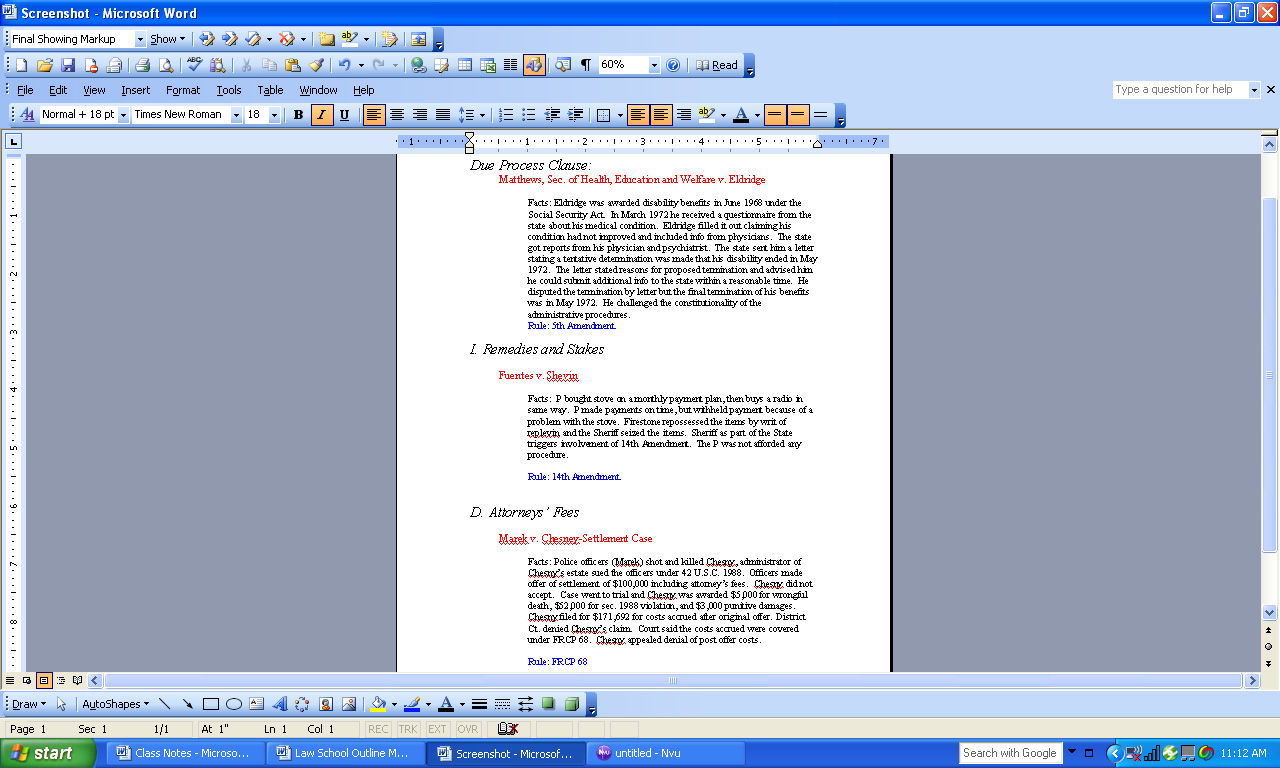
Below is the sample outline output the program creates as a MS Word
Outline. Notice how the fields, fonts and orientations match those
chosen in the previous display screen above and the information in this outline matches the information the student highlighted using the panels in sections I and II.
V. Once
marked up using the outliner panel buttons, the program saves the highlighting the student has done using
the outliner panel so he can create new outlines whenever he wants. He
can create further outlines immediately after creating his first
outline or weeks or months later.
*In order to instantly create more outlines from his notes, the
student simply
goes back to the Display/Order tab and selects the new fields and
headings (and their fonts/orientations) he would like. This way he can
easily create :
CASE LISTS
*To keep a running checklist of what's been covered in class as you go thru the course
RULE OUTLINES
*Crucial for success on issue-spotting exams
FACT LISTS
*Also great for matching up case facts with novel facts on issue-spotting exams
HEADINGS LISTS
*Also great for making a fact-pattern checklist for issue-spotting exams
OR ANY KIND OF OUTLINE HE LIKES, ALL EFFORTLESSLY AND EXACTLY THE WAY HE WANTS WITH JUST A FEW CLICKS OF HIS MOUSE !
AGAIN, CREATING AND STUDYING FROM MULTIPLE OUTLINES FROM HIS CLASS
NOTES IS THE BEST WAY FOR A STUDENT TO MAKE AND RECOGNIZE THE KEY
INFERENCES AND ASSOCIATIONS NEEDED TO DO WELL ON NOVEL FACT PATTERN LAW
FINAL EXAMS.
DIFFERENCE FROM MAJOR COMPETITORS :
The major companies providing law outlining software are:
1. Storelaw.com : Outliner 4.0
2. Aspen Publishers : AspenLaw Study Desk
3. Lexis Nexis : LexisNexis Notemap 2 (*Does
not apply because it is intended for practicing attorneys rather
than law students)
MS Word Law Outliner is different from the Storelaw.com and Aspen law outliners in three very important ways :
1. It is the only program that allows students to
create outlines directly from their own notes or other students' notes
for their class without having to paste or type them into a separate program or sift thru
commericialized outlines which do not match the cases and topics their
actual professors emphasize in class.
This is important, as most law students derive at least some if not all
of their notes for class from the typed notes of friends who have taken
the course with their professor before or from
their classmates' notes. Only this outlining program allows them to
instantly create outlines from these common sources of class notes !
2. While other outlining programs allow students to
make multiple outlines, MS Word Law Outliner has the most comprehensive
and easiest to use interface to allow students to effortlessly create multiple outlines rapidly and efficiently.
3. Due to the simplistic nature of this powerful
program it can be sold at a price that is much more economical to
Storelaw.com or Aspen's outliners while achieving phenomenal profit margins.
CONCLUSION :
MS
Word Law Outliner's incredibly easy to use interface and revolutionary
tools for allowing law students to effortlessly create multiple
outlines directly from their MS Word notes or notes from other students
will make it very attractive and useful product for America's law
students that will achieve high sales revenue (There are 40,000
potential customers !). It provides law students with an easy,
efficient and economical tool to create multiple outlines to
perform well on fact pattern and multiple choice law school
examinations.
*Future opportunities :
This program can be easily modified to work for
undergraduate students customized to their courses, or graduate
business, dental or medical students to create outlines for their
graduate business, medical or dental courses.